Kuli Kuli: Travel Translator
- 4.1
- Rating
- 500.00K
- Installs
- Free
- Price

 Analysis by App-foxy
I like travel apps that solve a clear problem without making me learn a complicated system, and Kuli Kuli: Travel Translator aims at exactly that: helping people communicate through voice, text, and photos while away from home. It sits in the Travel & Local category, comes from Mediocre Company, and is free to install, although it includes optional purchases priced from $4.99 to $39.99 per item. After spending time with it, my impression is that it is best understood as a practical conversation aid rather than a complete replacement for a human interpreter.
The appeal is easy to understand. A traveler may need to ask for directions, read a menu, understand a notice, or show a question to someone who does not speak the same language. Having voice, typed text, and camera-based translation in one place is more convenient than switching between separate tools. I also appreciate that the app is rated Everyone, which makes it approachable for families and casual travelers. Its store summary, “Translate Voice, Text & Photos,” describes the central idea accurately, while the short description simply identifies it as “Kuli Kuli.”
How Kuli Kuli feels in everyday travel
I find Kuli Kuli most useful when a travel question is shared between people rather than handled privately on one screen: one person can frame the situation, while another checks whether the translated wording matches what they meant. That small pause can catch an unclear phrase before it causes confusion. It also makes a shared phone easier to use thoughtfully, which leads into the practical boundaries I would set before handing it around.
You May Also Like

 Blood Strike: 2.5 Anniversary
Blood Strike’s Loadouts Turn Every Drop Into a Tactical Gamble
A close look at Blood Strike’s custom loadouts: how fast access to signature weapons reshapes its battle royale rhythm, rewards preparation, and narrows the gap between fights.

 Pandora - Music & Podcasts
Pandora’s Music Is Easy to Start, but Harder to Recover
Pandora’s strength is its low-effort path from a seed to a station. Its weak spot is how much confidence it asks you to place in connection, setup, and quiet recovery.

 8 Ball Pool
8 Ball Pool Is Built on Rivalries, Rematches, and Routine
A close look at the rivalries, rematches, shared routines, and unanswered safety questions that turn a quick pool match into a persistent mobile community.

 Samsung Music
Samsung Music’s Quiet Strength Is Playing What You Already Own
Its reach comes less from spectacle than from dependable access to a personal library. That simplicity is both the app’s strongest retention engine and its ceiling.

 AccuWeather: Weather Radar
AccuWeather Review: A Quick, Clear Forecast for Everyday Decisions
For everyday plans, the best forecast is the one you can understand quickly. AccuWeather makes rain timing, radar, and local conditions easy to act on, with a few trade-offs.

 Hill Climb Racing
Why Hill Climb Racing Still Turns Crashes Into One More Run
A tiny car, a bumpy hill and one more upgrade: Hill Climb Racing keeps resurfacing because its simple chaos makes every near-miss feel personal.
More From Our News Desk



A useful companion for quick conversations
The strongest use case is a short, practical exchange. Imagine arriving at a small bus station, unsure which platform leads to your destination. Instead of typing a long explanation, you can prepare a simple sentence, use voice input when appropriate, or show translated text on the screen. The same workflow can help when asking about an ingredient, confirming a hotel address, or explaining a basic need at a pharmacy.
I would not treat any translation app as an authority for complicated medical, legal, or financial conversations, and that caution applies here too. Short sentences and familiar words are easier to check than long, nuanced statements. My best results come from separating one idea into a few direct phrases rather than trying to translate a paragraph full of context, slang, and implied meaning.
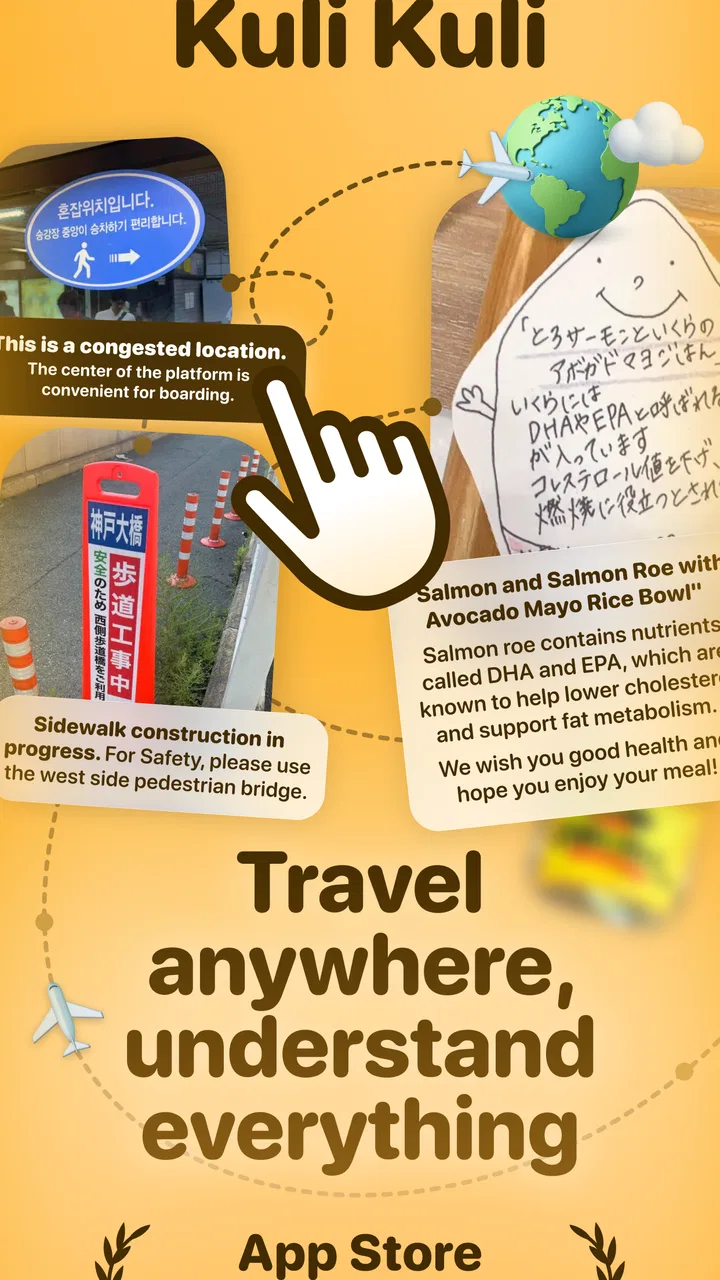
The photo option is particularly practical for information that is awkward to type. A sign, menu, ticket instruction, or product label can be easier to capture than reproduce manually. Still, camera translation depends on the image being readable. Glare, unusual lettering, curved packaging, artistic fonts, and crowded layouts can all make the result less dependable. I use the camera as a fast first pass, then compare the translation with the surrounding context before acting on it.
Choosing the right input method
One of the app’s useful strengths is that it does not force every situation into voice translation. Speaking is convenient when both people are comfortable with it, but it can be awkward in a noisy street, a quiet museum, or a crowded restaurant. Text is more discreet and gives me a chance to edit a sentence before showing it. Photos are better for fixed words already in front of me.
That choice of input is more important than it first appears. If I am asking a local person for help, I prefer a short typed phrase because I can inspect it before displaying it. If I am trying to understand a sign, I would not waste time retyping it. If pronunciation or spelling is difficult, voice can reduce the effort of entering the original sentence, but I would speak slowly and clearly rather than treating it like a hands-free conversation machine.
A good habit is to keep the translated wording visible while the other person responds. This creates a simple back-and-forth routine: I prepare a brief question, show or play it, listen to the answer, and translate only the part I need. That is usually less confusing than putting every sentence into one long exchange.
Where it fits beside familiar alternatives
Kuli Kuli competes with the usual translation tools built into phones, browsers, and travel services. Those alternatives may have broader language coverage, stronger offline behavior, or more mature conversation workflows depending on the platform and language pair. I would choose a familiar general-purpose translator first if I needed a feature-rich ecosystem, extensive language support, or a tool I already know works reliably for a particular destination.
Kuli Kuli makes more sense for someone who wants the essential modes gathered around travel situations without building a larger workflow. Its focus on voice, text, and photos gives it a straightforward identity. It is not automatically better than a phone’s built-in translator, but it can be easier for a traveler who wants one dedicated place to try the three most common forms of input.
The trade-off is that convenience should not be confused with guaranteed accuracy. A specialist translation service or a fluent local speaker remains the better choice for sensitive communication. For casual questions, signs, and everyday travel friction, the app is more compelling.
What has changed in the current release
The current version is 2.0.0, and the app was released on September 23, 2024. That version number suggests a meaningful stage in the product’s development, but I would be careful not to read specific new capabilities into it without an explicit change list. What I can judge is the current shape of the product: it presents translation through voice, typed text, and photos as its central experience rather than hiding those functions behind unrelated travel features.
For an existing user, the most important question is not simply whether the number changed. It is whether the current release makes the three input paths easier to reach, easier to understand, and less awkward during a real journey. A major version can be valuable when it improves the flow between capturing a phrase, checking the result, and sharing it with another person. I would test that flow before leaving home, especially if an older installation has become part of my travel routine.
The app supports Android 7.0 and later, which gives it a relatively broad compatibility range for people carrying older phones. That is useful for travelers who keep a previous device as a backup. At the same time, compatibility alone does not guarantee that every phone will offer the same camera quality, microphone performance, or general responsiveness. A newer phone may provide a smoother experience when capturing small print or speaking in a busy environment.
What the update means for people already using it
Existing users should approach the current release as a chance to review their habits rather than assume every translation problem has disappeared. Before a trip, I would open the app, confirm that the interface feels familiar, and practice switching between the three modes. That small rehearsal matters because the moment to translate is often stressful: a train is waiting, a queue is moving, or a shop assistant is expecting an answer.
I would also prepare a small set of short phrases in advance, not because the app replaces live translation, but because predictable wording reduces mistakes. Questions about directions, opening hours, payment, food ingredients, and accommodation can be written in simple language. When the situation arrives, I can adjust the phrase instead of composing everything from zero.
Another useful habit is to keep a second way to communicate available. A screenshot, handwritten address, map pin, or basic gesture can support the translation when audio is unclear. This is not a criticism unique to Kuli Kuli; it is a sensible travel practice for any app that depends on a phone, a camera, or a language engine. The app works best as one layer of a backup plan.
The free price lowers the barrier to trying it before a trip. However, the presence of in-app purchases means I would inspect any purchase screen carefully and decide whether the free experience already covers my needs. The listed purchase range runs from $4.99 to $39.99 per item, so the difference between casually testing the app and committing to optional extras can be significant. I would not buy anything until I had tested my most important travel scenario.
Small techniques that make the app more dependable
My first technique is to simplify the source sentence before translating it. “Could you please tell me whether this bus stops near the old town after six o’clock?” contains several details that can be separated. Asking “Does this bus stop near the old town?” and then “Does it run after six?” gives the other person clearer pieces to answer and makes a mistranslation easier to notice.
My second technique is to photograph documents and signs straight on, with the important words filling the frame. I avoid taking a wide scenic picture and expecting the app to identify a small line of text. If the image contains several unrelated notices, I focus on the one that matters. This saves time and reduces the chance that the translation mixes nearby words together.
My third technique is to use text when accuracy matters more than speed. Voice input is attractive, but accents, background noise, and fast speech can change the original sentence before translation even begins. Typing gives me control over what the app receives. When I am uncertain, I try a shorter typed version and compare it with the situation around me.
A fourth technique is to show the translated text instead of relying only on playback. The person I am speaking with may understand written language better than the pronunciation produced by the phone, or may want to reread the sentence. This is especially useful when discussing an address, a number, a food ingredient, or a place name that could be misheard.
Gaps I would keep in mind
The biggest limitation is the unavoidable gap between translating words and understanding intent. A literal result may miss politeness, regional expressions, humor, or cultural context. That matters less when asking where a restroom is than when negotiating a problem with a booking or explaining a dietary restriction. I would use the app confidently for low-risk exchanges and cautiously for anything where an incorrect interpretation could cause harm or expense.
Photo translation also has a practical ceiling. It can be fast when the text is clear, but it is not a magic lens for every document. Handwriting, decorative type, shadows, reflections, and partial views can all interfere. If a sign is important, I would take a second image from a better angle and read the surrounding symbols rather than trusting one capture.
Voice conversations have their own friction. Two people speaking quickly may produce a messy exchange, particularly when the phone is passed back and forth. I find the app more useful when each person takes a turn and the phrases stay short. Travelers expecting a seamless simultaneous interpreter may find that approach slower than they hoped.
There is also the question of dependence on a phone during travel. Battery life, connectivity, camera quality, and the general condition of the device all affect the experience. I would charge the phone before a long day, save important addresses in another form, and avoid making Kuli Kuli the only way to communicate. The app can reduce language friction, but it cannot remove ordinary travel risks.
Who should use it, and who should choose something else
I think Kuli Kuli is a good fit for occasional travelers, students, families, and visitors who want a simple translation companion for everyday situations. It is also appealing to people who regularly encounter mixed formats: spoken questions, printed signs, and text messages. The free entry point makes it easy to test on a short trip before deciding whether optional purchases are worthwhile.
I would be more cautious about recommending it as the primary tool for professional interpreters, frequent international business travelers, or anyone handling high-stakes communication. Those users may need specialized terminology, stronger control over translation history, broader language support, or a workflow designed for extended conversations. A mature general translator, a specialist service, or a human interpreter may be the better investment in those cases.
People with older Android phones may appreciate the minimum requirement of Android 7.0 or later, but I would still test the camera and microphone on the actual device. A phone that struggles to focus or record clear speech can make a capable translation app feel unreliable. The practical question is not only whether the operating system is supported, but whether the whole travel setup is comfortable to use.
What I would watch as the product develops
With version 2.0.0 as the current reference point, I would watch for improvements that make real travel exchanges less demanding: clearer movement between voice, text, and photo input; better handling of imperfect images; and a more predictable way to review or correct a phrase before sharing it. Those are the areas that would most directly improve trust without changing the app’s basic identity.
I would also pay attention to how optional purchases affect the everyday experience. A free app is attractive when its core travel workflow remains useful without pressure. If paid items add meaningful convenience, the value will depend on how often someone travels and how heavily they rely on translation. For an occasional vacation, the free experience may be enough; for repeated trips, a purchase could make sense only after testing the app in the languages and situations that matter.
The app already has a visible user base, with more than 500,000 installs, a 4.1 average rating, and around 700 ratings. Those figures suggest genuine interest, but they do not tell me whether it is equally strong across every language, phone, or travel environment. I would treat the rating as an encouraging signal, then judge it against my own destination and communication needs.
My final take after using it
Kuli Kuli: Travel Translator is a focused, approachable travel app that brings voice, text, and photo translation into one place. I like it most when I use it deliberately: short phrases for conversations, careful photos for signs, and typed text when I need to inspect the wording before showing it. That workflow feels realistic and useful rather than promising effortless communication in every situation.
Its weaknesses are equally important. Translation can lose context, camera input needs good images, and voice exchanges are less smooth when people speak quickly or the surroundings are noisy. The optional purchase range also means I would test the free version before spending money. None of those points makes the app a poor choice, but they define where it belongs.
My recommendation is to try it before your trip, not for the first time during an emergency. Practice a few likely phrases, photograph a sample sign, and see whether the interface suits your phone. If you want a compact tool for ordinary travel questions and quick reading help, this app is worth considering. If you need professional-level certainty or complex interpreting, I would choose a more specialized alternative or rely on human assistance instead.
FAQs for Kuli Kuli: Travel Translator
01What is Kuli Kuli: Travel Translator used for?
Kuli Kuli: Travel Translator is designed to help travelers communicate when they do not share the same language. It can be useful for translating everyday phrases, understanding basic conversations, and handling practical situations such as ordering food, asking for directions, checking into accommodation, or communicating while sightseeing. It is best viewed as a travel aid rather than a complete replacement for a professional interpreter.
02Does Kuli Kuli: Travel Translator work offline?
Offline availability can be especially important when traveling because mobile data may be expensive, unreliable, or unavailable. Before relying on Kuli Kuli during a trip, check the app’s current listing and settings to see whether language packs or translation features can be downloaded for offline use. Some functions may still require an internet connection, particularly voice translation, updates, or less commonly supported languages.
03Which languages and translation features does the app support?
The languages available in Kuli Kuli: Travel Translator may vary depending on the device, operating system, app version, and the specific translation mode being used. Users should review the supported-language list before downloading if they need a particular language. Also check whether the app offers text, voice, camera, or phrase-based translation, since support may differ between these features.
04Is Kuli Kuli: Travel Translator accurate enough for important conversations?
The app can be helpful for common travel expressions and simple exchanges, but automatic translation is not guaranteed to be perfect. Accuracy may be affected by accents, background noise, unclear pronunciation, slang, regional expressions, and complicated sentences. For medical, legal, business, or emergency communication, users should confirm the meaning carefully and seek assistance from a qualified human interpreter whenever possible.
05Is Kuli Kuli: Travel Translator free to download, and does it require permissions?
The download model, advertising, subscriptions, or optional in-app purchases may depend on the current version and platform. Review the Google Play or App Store listing for up-to-date pricing details before installing. If the app uses voice input, it may request microphone access; camera translation may require camera permission, while online features can involve network access. Grant only permissions that match the features you intend to use.
Pros
- Works offline for essential travel phrases and translations.
- Simple interface makes it easy to use while on the move.
- Useful phrase categories cover common travel situations.
- Audio pronunciation helps users communicate more confidently.
- Lightweight app that requires little storage space.
Cons
- Translation accuracy may vary with slang and complex sentences.
- Offline language support may be limited compared with online tools.
- Some features or languages may require in-app purchases.
- Voice input can struggle in noisy surroundings or with accents.
- The app may feel basic for users needing advanced translations.

Kuli Kuli: Travel Translator
Gallery